How to Check Your Name on JAMB Matriculation List
The JAMB matriculation list is the official document of students admitted into the Nigerian tertiary institutions through the Joint Admissions and Matriculation Board (JAMB). If your name appears on this list, it means that your admission is genuine and recognized for NYSC mobilisation.
If you gained admission through Jamb or Direct Entry, should ensure your name appear on the Matriculation List before completing your studies to avoid issues during their graduation or NYSC mobilisation.
We are WWWASSIST and we make educational information easy to read, understand, and use.
Before i dive into How to Check the Jamb Matriculation List, lets quickly see why your Data should be on the list.
Importance of Matriculation List
- Confirmation of Admission: the matriculation list Confirms that your admission is genuine and approved by JAMB
- NUC recognition: Also, it proves that your admission is recognized by the National Universities Commission
- Graduation validity: It will be Required for official graduation recognition: Your school will need to verify that you got your admission through jamb; hence the Jamb Matriculation List is used.
- NYSC eligibility: The National Youth Service Corps Scheme (NYSC) uses the JAMB Matriculation List, to confirm that Prospective Corps Members are graduates of various tertiary institutions.
Read also: How to Check Your Name on NYSC Senate list
Before Checking Your Name on the List
Before you proceed to checking your name, it is important that you
- know your year of Admission,
- Your Jamb registration Number
- Have good internet connection
Requirements to be on the JAMB Matriculation List
Before your name can appear on the list,
- You must have been offered admission into your institution of choice through the JAMB CAPS.
- You must Accept and print your JAMB Admission Letter from the JAMB CAPS.
- You must also print your original JAMB result from the e-Facility portal.
How to Check the JAMB Matriculation List
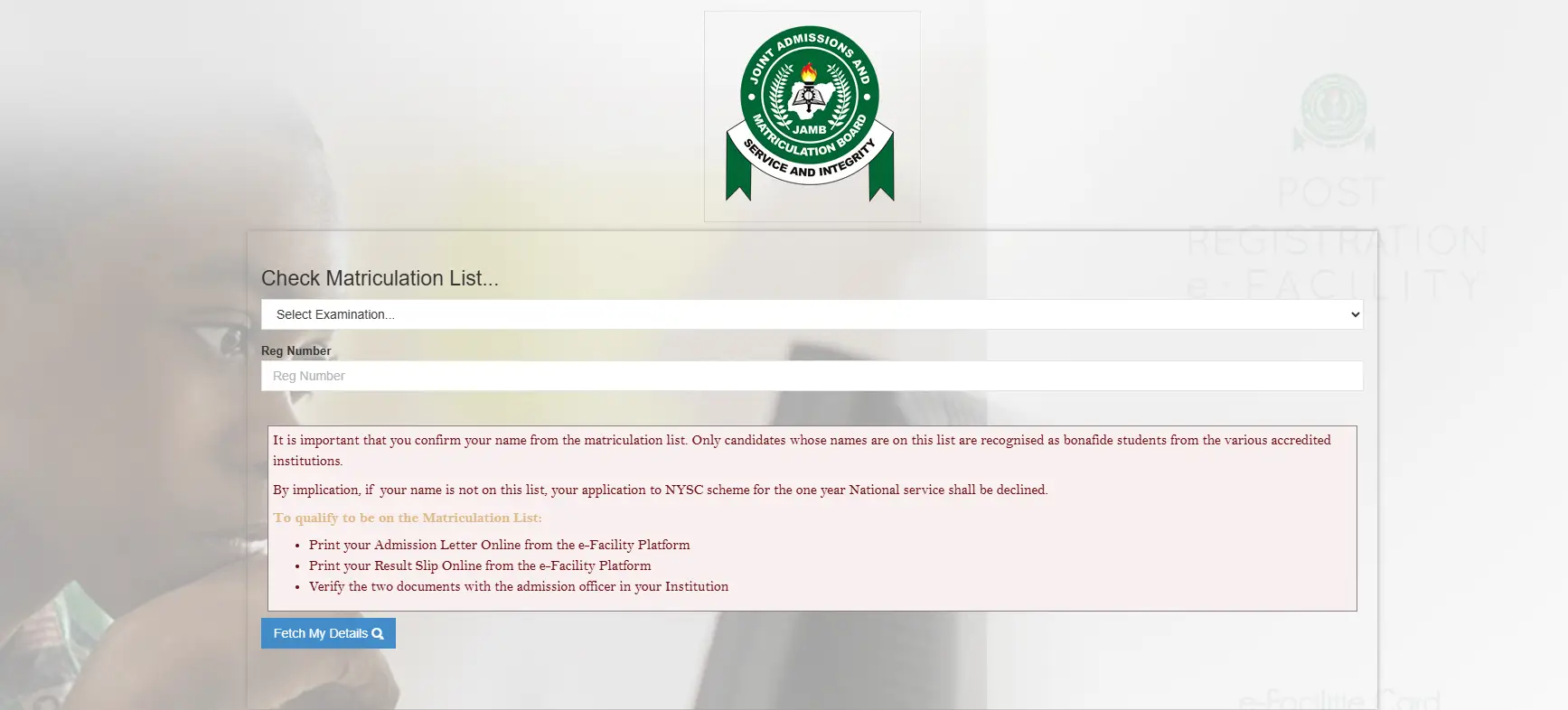
- Visit the official jamb portal at efacility.jamb.gov.ng/CheckMatriculationList
- Select your examination or Year of Admission
- Input your JAMB registration number
- Click on “Fetch My Details” to view your matriculation status.
- Your details will appear if you are on the list
Possible Result
| What You can See | Meaning | What To Do |
|---|---|---|
| Your details appear | Your name is on the JAMB matriculation list | Save a screenshot + proceed with school clearance |
| No record found | Your admission may not be uploaded/validated yet or you’ve supplied a wrong detail | Use the fixes below and recheck later or crosscheck your details |
| Error / page not loading | Portal traffic, browser issue or network disconnection. | Retry off-peak, switch browser, use desktop view, change your loaction or switch network |
What If Your Name Is Not on the List?
If your name does not appear on the JAMB Matriculation List and you are sure; you gained your admission through the Joint Admissions and Matriculation Board (JAMB):
- Print your admission letter: Log in to JAMB e-Facility at https://efacility.jamb.gov.ng/Login and print your official admission letter
- Visit your institution: Take the letter to your admission office for verification
- Contact JAMB: File a complaint at the nearest JAMB office If admitted properly but not on the list.
- Consider regularization: This are for candidates admitted outside JAMB must register for JAMB Regularization
Read also: How to Check and Accept Admission on JAMB CAPS