How to Check NYSC Payment Status
After making payment, it is important to confirm your payment before proceeding.
I always get the complaints from PCM about not being able to confirm their NYSC Payment and not Knowing how to navigate the confirmation process, I’ve decided to put up this article to guide you through your payment confirmation procedure.
We are WWWASSIST. We bring all your All Educational search to you. Making information easy to read, understand and use.
How to Check NYSC Payment Status
Step 1: Visit the NYSC Portal
Go to the official NYSC Registration Portal.
Step 2: Select the Payment Status
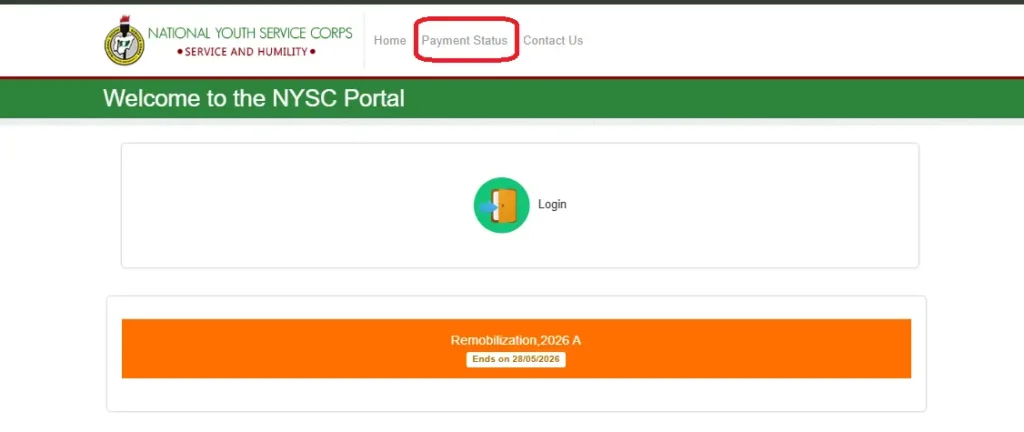
On the home page, Look Just above: on the Navigation bar, Click on the “Payment Status”
Step 3: Supply your Transaction ID/Email
You will be prompted to input your Transaction ID/Email to continue.
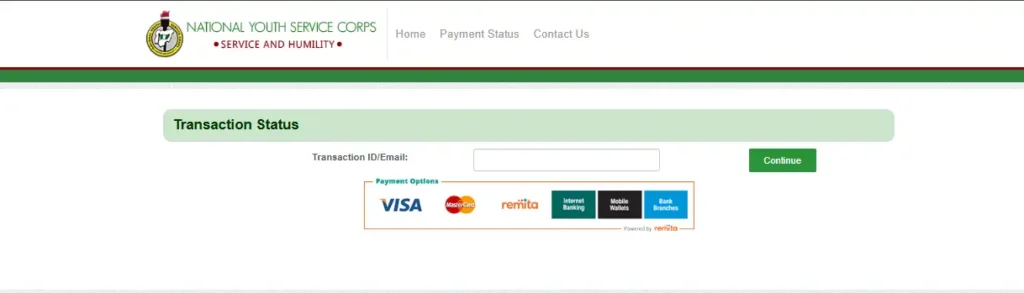
Step 4: Click on Continue
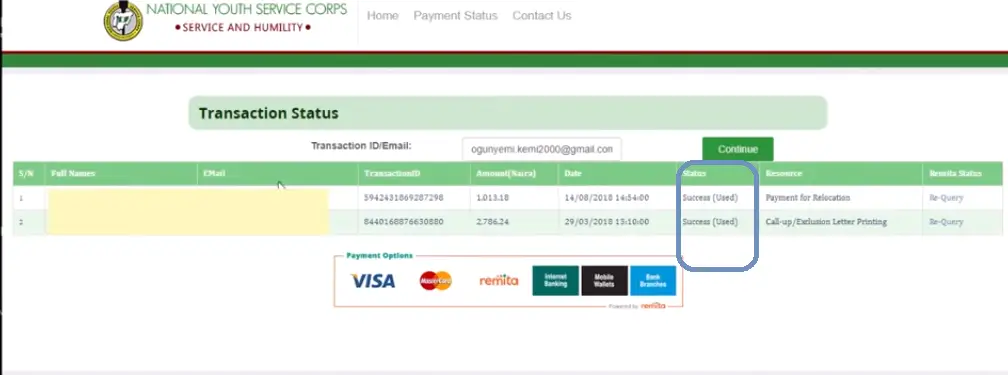
Clicking the Continue button will display your status. if your transaction was successful or not.
Status: Your status might either display Pending or Success
Conclusion
If you’ve made payment and your Status still shows Pending, Then click on the Query and wait for it to refresh. Hopefully the status will change. make sure you have a stable internet connection during this process.
Related Article
How to Collect Your NYSC Exemption Certificate
How to Apply for Redeployment in NYSC
How to Check Your Name on NYSC Senate list